🚀 Introduction
The Challenger Continent mod (挑战者大陆) is the result of extensive bug fixing plus content updates and corrections built on top of Rune Awakening 9.8 (符文觉醒9.8). With the original author’s permission it was renamed Challenger Continent, to make the two easy to tell apart. For what was changed and what was added, please read the changelog. Challenger Continent is not compatible with other full overhaul mods (Starlight (星光) and the like).
If the bosses are beating the life out of you, you can play without loading Fallen Horde (群魔堕落) for now.
📝 Changelog
Please visit the mod changelog page (Chinese)
Download links
- Through the QQ group
- Challenger download site, download speed not guaranteed (Chinese)
📦️ What the folder contains
挑战者大陆--组件00--暗黑世界.MOD   (Component 00: Dark World; extracted as a standalone mod for the multiplayer build)
挑战者大陆--组件01--至尊适配.MOD   (Component 01: Supreme Compatibility)
挑战者大陆--组件02--护身符.MOD    (Component 02: Amulets)
挑战者大陆--组件04--通用素材.MOD   (Component 04: Shared Assets)
挑战者大陆--组件05--暗黑传奇.MOD   (Component 05: Diablo Legacy)
挑战者大陆--组件06--职业技能.MOD   (Component 06: Class Skills)
挑战者大陆--组件08--群魔堕落.MOD   (Component 08: Fallen Horde)
挑战者大陆--组件09--佣兵系统.MOD   (Component 09: Mercenary System; pick pet OR mercenary, never load both)
挑战者大陆--组件10--宠物系统.MOD   (Component 10: Pet System; pick pet OR mercenary, never load both)
💩 FAQ
-
Q: Can I add another inventory/bag mod?
-
A: Not recommended: it would overwrite the inventory setups that the Amulets and Diablo Legacy components depend on.
-
Q: It looks like a few component numbers are missing. Am I missing some mods?
-
A: Those numbers are reserved for components that may be added later. As long as the numbers run from small to large, top to bottom, everything is fine.
-
Q: Can I take both the mercenary and the pet?
-
A: No.
-
Q: How do I browse the new recipes?
-
A: The transmuter screen shows every recipe. If you prefer to browse by hand, see the recipe list
🔧 Installing, ordering, and updating the mods
Installation
Copy the Challenger Continent mod files into the directory below. If there is no mods folder, simply create one yourself.
C:\Users\YOUR_USERNAME\Documents\my games\runic games\torchlight 2\mods
Make sure to substitute your own username.
Load order
After launching the modded game, arrange the components so the numbers run from small to large, top to bottom.
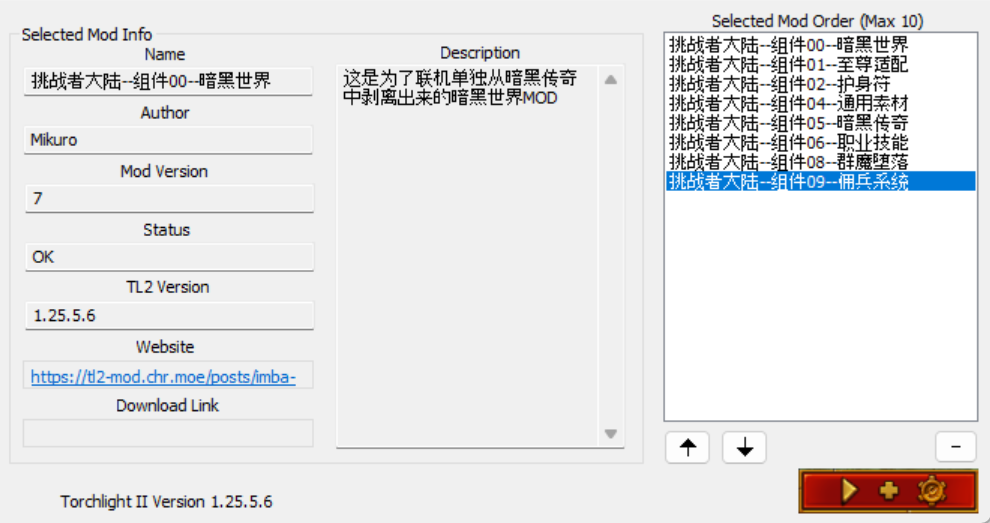
Updating
💬 The game won’t open, or crashes
- If you enabled the console or a cheat tool, you are on your own
- If your copy of the game is not legitimate, we recommend buying the real one (it is on sale all the time)
- Too much gear lying around on the map: choose a LAN game and tick the re-create world option (刷新世界)
- Check the notes in the changelog
- If you loaded other mods that are not part of Challenger Continent, please sort that out yourself
- Delete the file
C:\Users\USERNAME\Documents\my games\runic games\torchlight 2\local_settings.txtand relaunch the game - Delete the folder
C:\Users\USERNAME\Documents\my games\runic games\torchlight 2and relaunch the game - Install the
VC runtime; the files can be downloaded in the QQ group. Unzip, then run自动安装VC运行库(auto-install VC runtime) and it installs automatically - Steam users: please launch the game from the Steam client
Coming over from Rune Awakening
In theory and in testing, the character stash and the shared stash are unaffected, but to be safe, backing up your legacy is never wrong. Given how many people say their old saves no longer work: if you really need an old save, load it with the old Rune Awakening mod and throw away all equipment and stones — it might get in then. This issue will not be discussed further; it costs too much time. The mod removed fashion outfits (时装) as well as the second armor set. We recommend unequipping everything from your character before switching, otherwise you may end up wearing nothing but a fashion set.