Overview
The Mikuro Launcher is a replacement launcher for Torchlight II. The official ModLauncher caps you at 10 mods — but that cap only exists on the launcher’s side; the engine itself has none. The Mikuro Launcher scans .MOD file headers directly, generates a loading scheme and starts the game — stack as many mods as you like. It also folds the whole MIKURO enhancement suite, DXVK compatibility, multiplayer servers and save tooling into one window: tick a box and it works.
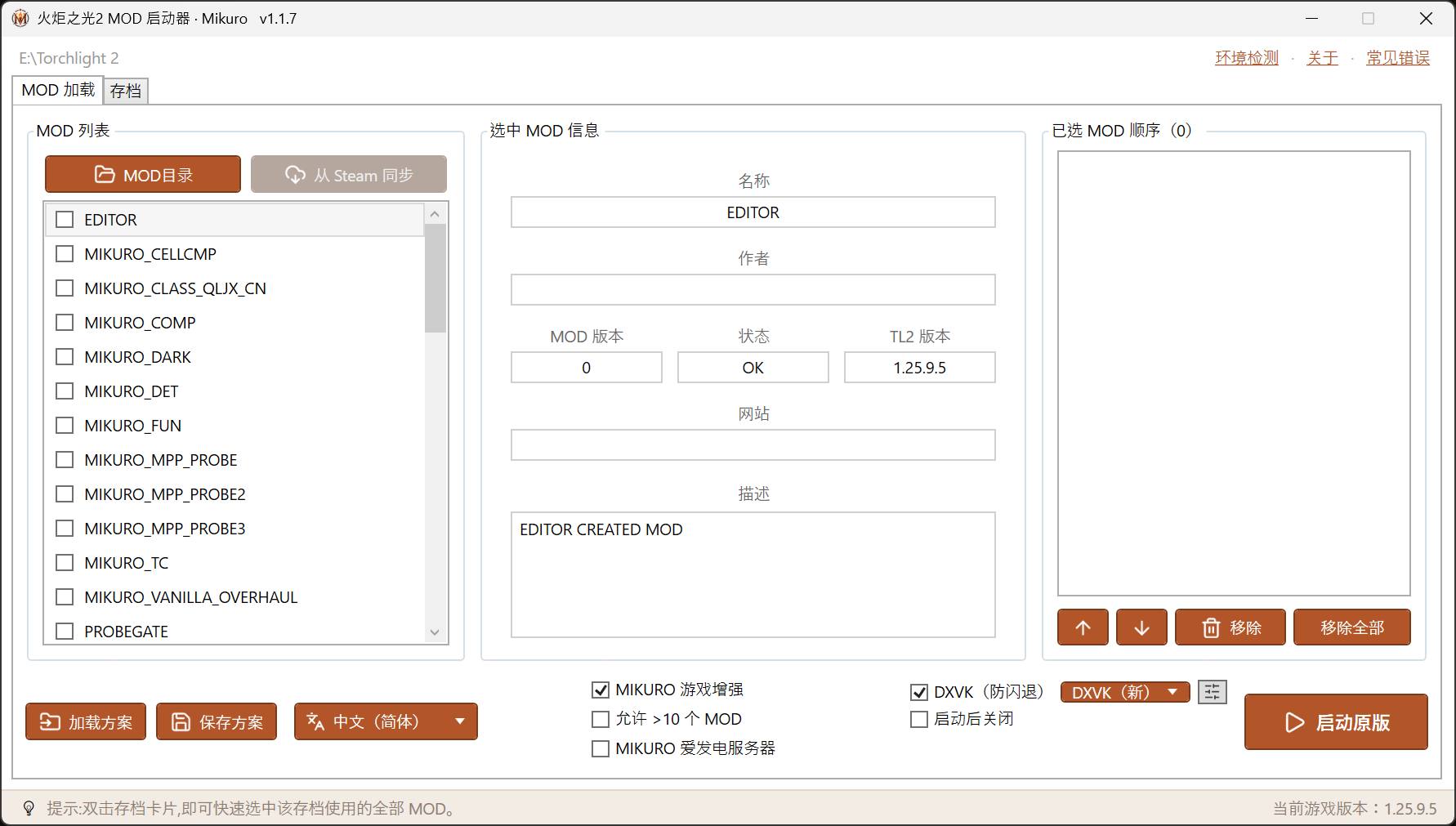
Ⅰ Unlimited Mod Loading
- No more 10-mod cap. Writes
modlauncher.schdirectly and starts the game withMODSCHEME=, bypassing the old launcher’s counter. A full Challenger Continent stack plus other mods is no problem. - Drag to reorder — order is priority. The “selected mods” panel on the right is drag-sortable; Torchlight II’s override rule is first-loaded wins, so mods higher in the list override those below.
- Selection details at a glance. Name / author / mod version / game-version match / description, shown as soon as you select an entry.
- Save and load schemes. Keep favorite combinations as reusable
.schschemes. - No mods selected = vanilla launch. With nothing ticked, the button switches to “Launch Vanilla” and reads your vanilla characters from
save\— no accidental trips into the mod-save folder.
Ⅱ MIKURO Runtime Enhancements
One switch — “MIKURO Game Enhancement” — injects the MIKURO runtime into the game (installed as a d3d9.dll proxy, single-player / host only, language follows the UI). It brings a set of upgrades vanilla never had, without touching the save format:
- Loot filter — filter ground drops by rarity / type, auto-detects mod-defined rarities (EPIC / RUNE, etc.); quest items are never swallowed; rules adjustable in-game at any time.
- Save / zone-transition crash fix — byte-level runtime repair of crashes triggered by oversized bags and stashes when saving, loading or changing zones. Fail-safe by design and on by default — any anomaly falls back to vanilla behavior.
- Haste gem socket gating — cooldown-reduction gems can only be socketed into weapons / helmets / gloves, matching their description (fixes “sockets anywhere, works anyway”).
- Multiplayer-safe — enhancements activate only in single-player or when you host, so they never break multiplayer validation.
The enhancement layer and the loot filter live in the same `d3d9.dll` proxy — one switch turns on the whole suite. — one toggle, the full kit
Ⅲ DXVK Graphics Compatibility
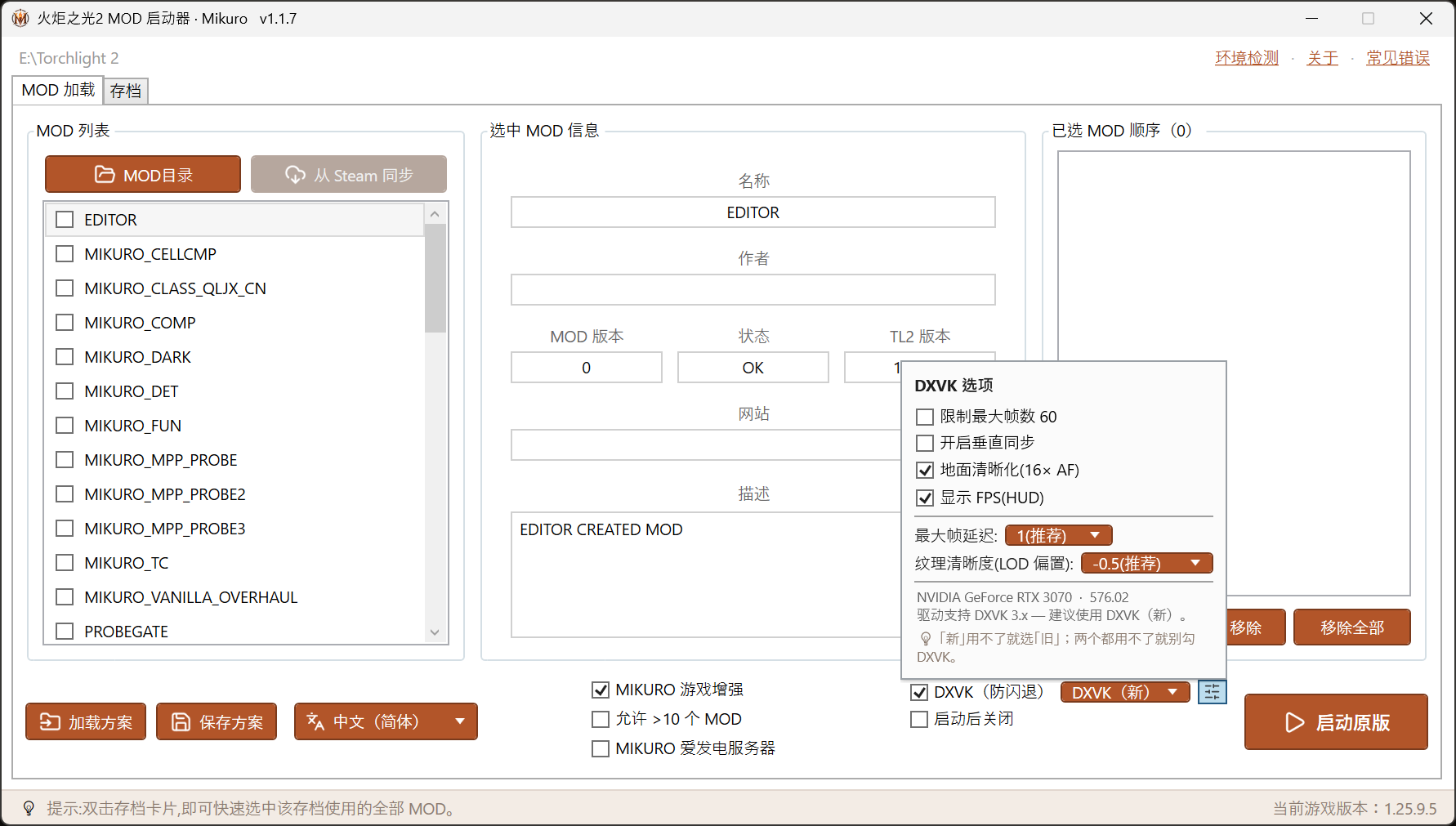
Torchlight II’s aging D3D9 renderer black-screens or instantly exits on some modern drivers and GPUs. The launcher bundles DXVK (translates Direct3D 9 to Vulkan) and does two things for you:
- Dual builds, auto-picked by driver. Ships both DXVK 3.x (new) and 2.7.1 (legacy); the launcher reads your GPU driver version and recommends one — recent NVIDIA drivers get “new”, older ones fall back to “legacy”.
- Optional quality knobs. 60 FPS cap, v-sync, ground texture sharpening (16× AF), FPS display, max frame latency, texture LOD bias — all with recommended values. The legacy build exposes just the frame cap and v-sync.
- Downgrade guidance built in. The dialog itself says: if “new” fails try “legacy”; if both fail, leave DXVK off.
Ⅳ Save Manager
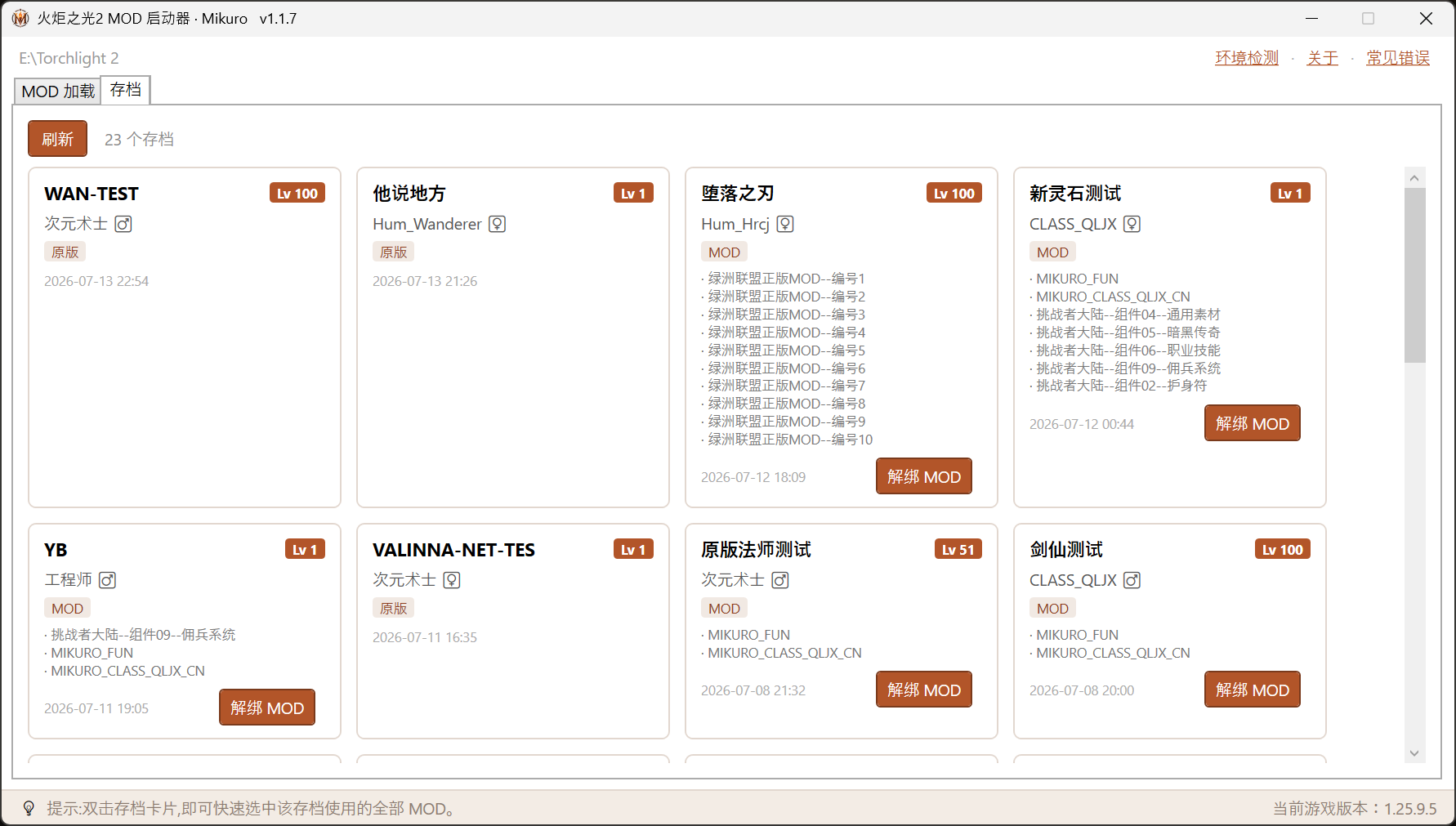
The “Saves” tab turns the characters in save\ and modsave\ into cards, with a set of safe save tools:
- Everything at a glance. Each card shows character name, level, class (with gender), vanilla / mod badge, and which mods the save uses (attributed automatically).
- Precise per-mod unbinding. Want to drop a mod without junking the save? Tick the mods to unbind; only when you unbind the mod that actually provides the class are you asked to pick a vanilla replacement class — removing ordinary content mods leaves the class untouched. Results are written back to
modsave\with an automatic.bakbackup. - Double-click to select the save’s mods. Double-click any save card and the launcher ticks that save’s recorded mods in their original order and jumps back to the loading tab — no more guessing what you had installed.
Ⅴ Multiplayer: MIKURO Afdian Servers
The official lobby server is up and down these days, so MIKURO runs dedicated multiplayer servers for Afdian supporters. Tick “MIKURO Afdian Server” and the launcher writes the lobby address (LOBBYHOST) into the game settings before starting — then just pick “Internet” in-game. No config files to edit by hand:
- Chinese UI → Guangzhou server, other languages → Australia server, chosen automatically by interface language.
- The address is written on every launch, which defeats Steam Cloud’s habit of reverting settings at startup and un-doing your lobby address.
Ⅵ Quality of Life
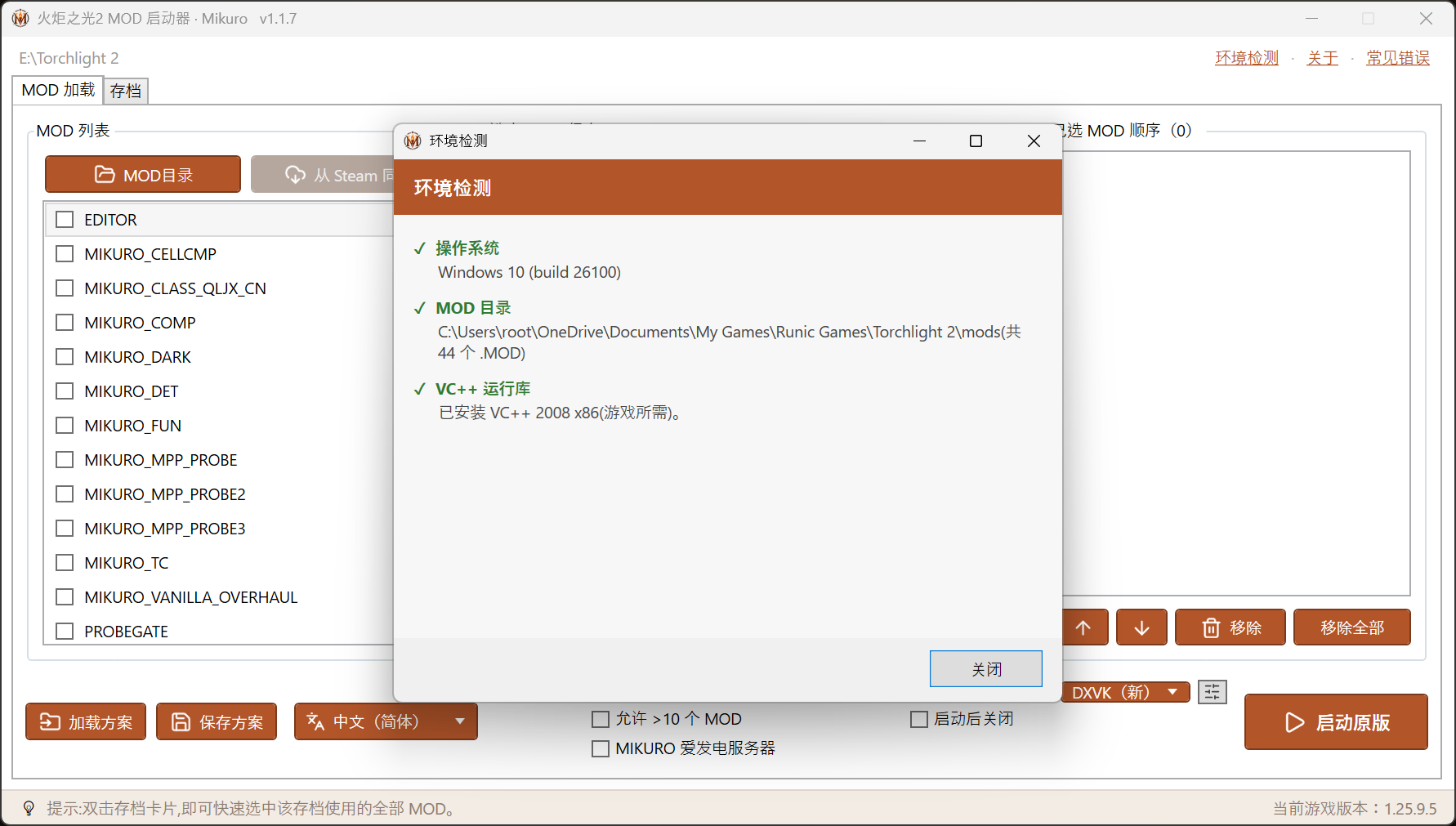
- Environment self-check on launch. Every start checks OS / mod folder / VC++ runtime and only pops up when something’s wrong (all-green stays silent); “don’t auto-check again” is available, and the top-bar “Environment Check” runs it on demand.
- Misplaced-mod detection. The check scans the usual wrong spots (game install dir, settings root, double-nested folders) and tells you where stray
.MODfiles should go. - VC++ runtime detection. The game needs VC++ 2008 x86; without it you get “msvcp90.dll not found” and no game — the self-check calls it out and tells you to install it.
- Overlay conflict warning. The loot filter and DXVK both hook D3D9; overlay / recording tools fighting for the same hook can stop the game from starting — the launcher warns you to close them.
- Auto-update. Checks for new versions online and shows a banner up top.
Requirements
- Windows 10 / 11 only. The launcher is .NET-based and does not support Windows 7 / 8 (it fails right at startup).
- Requires the VC++ 2008 x86 runtime (a dependency of the game itself; the self-check will remind you).
- DXVK 3.x needs a reasonably recent GPU driver; on older drivers switch to “legacy” in the DXVK options.
Download & Updates
The launcher ships with the Challenger Continent mod pack; version history lives in the Mikuro Launcher changelog (Chinese).