🚀 Introduction
The Challenger Continent mod (挑战者大陆) is the result of extensive bug fixing, content expansions, and balance revisions built on top of Rune Awakening 9.8 (符文觉醒9.8).
With the original author's permission, it was officially renamed Challenger Continent to distinguish it from older versions.
For details on changes and newly added content, please refer to the Changelog.
Challenger Continent is a major overhaul mod and is not compatible with other large overhauls (such as Starlight). Please do not combine them.
Tip: If early-game bosses feel overwhelmingly difficult, you can temporarily disable the "Fallen Horde" (群魔堕落) component while leveling up.
📝 Changelog
Please visit the Mod Changelog Page.
📥 Download links
- Official player QQ group (files section)
- Challenger Download Site (Mirror)
📦️ What the folder contains
挑战者大陆--组件00--暗黑世界.MOD   (Component 00: Dark World; extracted standalone for multiplayer; do not enable in co-op)
挑战者大陆--组件01--至尊适配.MOD   (Component 01: Supreme Compatibility)
挑战者大陆--组件02--护身符.MOD    (Component 02: Amulets)
挑战者大陆--组件04--通用素材.MOD   (Component 04: Shared Assets)
挑战者大陆--组件05--暗黑传奇.MOD   (Component 05: Diablo Legacy)
挑战者大陆--组件06--职业技能.MOD   (Component 06: Class Skills)
挑战者大陆--组件08--群魔堕落.MOD   (Component 08: Fallen Horde)
挑战者大陆--组件09--佣兵系统.MOD   (Component 09: Mercenary System; pick pet OR mercenary, never load both)
挑战者大陆--组件10--宠物系统.MOD   (Component 10: Pet System; pick pet OR mercenary, never load both)
❓ Frequently Asked Questions (FAQ)
Q: Can I add another inventory or bag mod?
A: Not recommended. Third-party inventory mods will overwrite the custom amulet slot and the expanded stash configurations in Diablo Legacy, which can cause UI glitches or save corruption.Q: Some component numbers seem to be missing (e.g. 03, 07). Did I miss some mods?
A: No. Missing numbers represent reserved slots or retired components. As long as the components in your launcher are sorted in ascending order from top to bottom, the game will load normally.Q: Can I use both the mercenary and pet systems together?
A: No. The two systems have underlying mechanism conflicts and are strictly mutually exclusive.Q: Where can I check the newly added crafting recipes?
A: You can view all recipes in-game by talking to the Transmuter NPC, or browse the web-based Recipe Codex.
🔧 Installing, Ordering, and Updating
Installation
Copy the .MOD files into your game's mods directory. If the mods folder does not exist, create it manually:C:\Users\YOUR_USERNAME\Documents\My Games\Runic Games\Torchlight 2\mods
(Replace YOUR_USERNAME with your actual Windows username)
Load order
Ensure all components are arranged in ascending numerical order from top to bottom. We recommend using Mikuro Launcher for automatic load order management.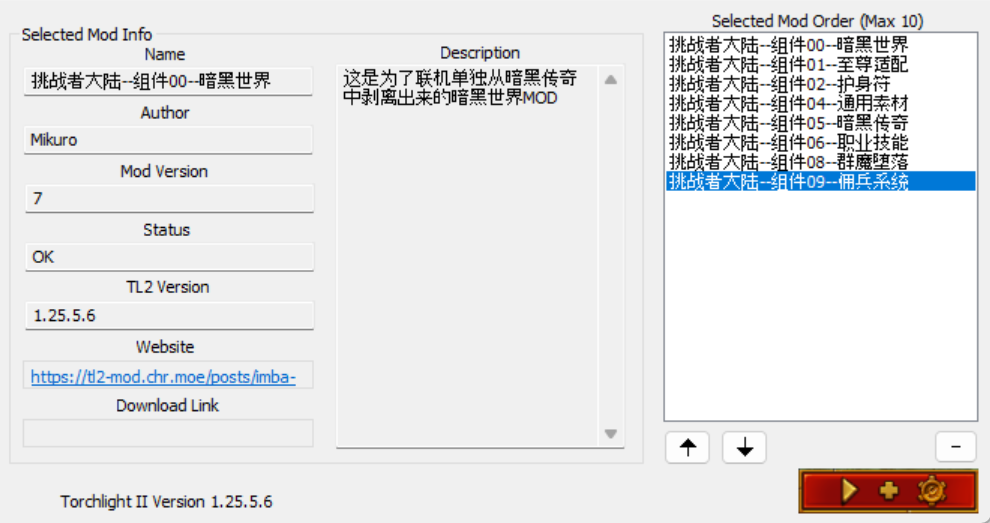
Updating
When updating the mod, always backup your saves first, remove previous .MOD files from the mods folder, and then paste the new version's files to prevent conflicts between old and new files.
💬 Troubleshooting: Crashes or Startup Failures
- Disable cheats and console commands: Console commands or memory trainers can corrupt game state and trigger crashes. Revert to a clean state for troubleshooting.
- Client version: We recommend using the legitimate Steam or GOG version (1.25.x). Modified or repacked third-party clients often miss essential runtime files or cause binary mismatches.
- Excess ground items: If excessive item drops cause framerate drops or crashes upon zoning, create a LAN game with "Reroll World" (刷新世界) enabled to reset instances.
- Check changelog: Incompatible updates or removed items are documented in detail in the changelog.
- Third-party mod conflicts: If you have other mods installed besides Challenger Continent, try disabling them to isolate the issue.
- Reset settings: Delete
Documents\My Games\Runic Games\Torchlight 2\local_settings.txtand relaunch the game to regenerate default settings. - Clear configuration directory: If crashes persist, backup your save folders (
save/modsave), delete theTorchlight 2directory underDocuments\My Games\Runic Games\, and let the game recreate a fresh environment. - Install VC++ runtime: Torchlight II depends on Visual C++ 2008 x86. If you receive an error about missing
msvcp90.dll, install the VC++ 2008 x86 redistributable. - Steam users: Ensure the Steam desktop client is running and logged in before launching the game or launcher.
🔄 Migrating Saves from Old "Rune Awakening"
- In our testing, character inventory and shared stash contents carry over cleanly; however, to be safe, always make a complete backup of your saves before migrating.
- Because many legacy items and affixes were removed or restructured, directly loading an old save may cause errors. To migrate an old character, load it first under the old mod, remove all equipped gear and socketed gems into stash/inventory or discard them, and then transfer the save to the new version.
- The costume system and the second armor set have been removed. Unequip all gear before updating to avoid missing items or visual anomalies caused by deleted slots.